Dedicated Locator Resources & Frequently Asked Questions
Learning Centre
Build your knowledge of safe digging and locate management through Ontario Dig Authority’s online training.
Courses include:
- GroundWork
- GroundWork Pro
- KnowR!sk
Best Practice Guides
Project Owners, Excavators, DLSPs
How to Search for DL Locate Requests for UIOs
The Ontario Dig Authority Web Portal allows you to search and view requests processed where your Station Code(s) has been suppressed. You can use the basic search when you have a specific DL Locate Request number, or you may use the “advanced search” to search for all requests by Station Codes(s).
Search Bar On The Home Page
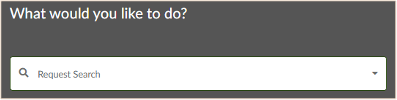
DL Locate Requests (DL Project Work) will always start with 202
Advanced Search Steps
Step 1: Log into the Web Portal
Step 2: Click on ‘Request Search’
Step 3: Toggle the ‘Advanced Search’ option
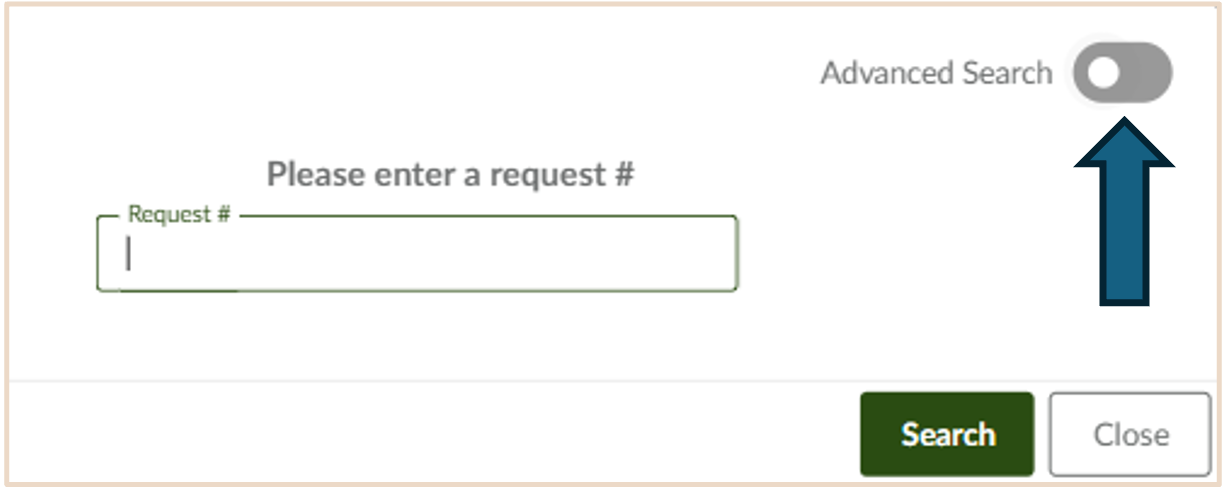
Step 4: Define the Received Date range and the Station Code.
Note: Searches can only be made for a maximum of 30 days at a time. Add multiple Station Codes by clicking on the field and adding codes one at a time.
Optional: You may search by contractor name or City to help narrow down the results. You can use an asterisks * as a wildcard search for the Dig Location (i.e. Vaug* for Vaughan). The System searches for single tier or lower tier Municipality/City names only.
How to Respond to a Dedicated Locator Notice – UIOs
This guide will help you navigate the process of updating the status for your station code(s) under a Dedicated Locator (DL) Notice.
Preliminary Checklist
- Ensure that your DL Contact Information is listed on your ‘Notification Instructions’ form and is up-to-date
- If you require a contact update, please reach out
- Confirm that you have a Web Portal account associated with your station code(s).
- If you do not have a Web Portal account, and/or are not associated with your station code, please reach out to the DL Team.
- Establish a process for responding to a DL Notice within 10 business days
- Review each ‘Notice of Dedicated Locator Project’ email sent from SupportServices@OntarioDigAuthority.ca
- Keep an open line of communication with the DL Team, the Project Owner, and the Dedicated Locate Service Provider (DLSP)
Step 1:
Log in to the Web Portal
Step 2:
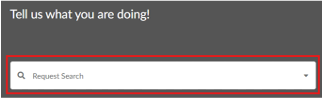
Click on the ‘Request Search’ box, enter the DL Notice # (starting with ‘502’), & click ‘Search’
Step 3:
Review the DL Notice and the details provided
Step 4:
Contact the Project Owner, the DLSP listed on the DL Notice, or the DL Team for clarification
Step 5:
Agree in writing with the Project Owner upon the DLSP
- Paragraph (a) of subsection 7(7) of the OUINS Act
Step 6:
Provide the DLSP with mapping and other information required regarding your infrastructure
- Paragraph (b) of subsection 7(7) of the OUINS Act
Step 7:
When you are prepared to provide your decision of the proposed DLSP, click ‘Edit Request’ at the top of the page

Step 8:
Click ‘DL Notice Sign Off’

Step 9:
Scroll to the ‘Infrastructure Owner Decisions of proposed DLSP’ section, and click ‘Edit’ next to your station code(s)

Step 10:
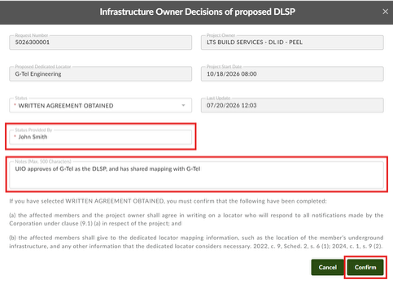
Select a ‘Status’ from the drop-down menu:
- Written Agreement Obtained: This indicates that the UIO has complied with the OUINS Act (agreed in writing on the DLSP, and provided them with mapping)
- More Information Required: UIO requests additional information
- Standard Locate Required: This station code is an exempt Transmission or has received a determination from Ontario Dig Authority to respond to notifications respecting the member’s own underground infrastructure under subsection 7 (6.3)
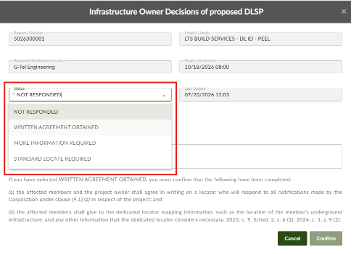
It is important to note that selecting ‘WRITTEN AGREEMENT OBTAINED’ confirms that you have complied with paragraphs (a) and (b) of subsection 7 (7) of the Ontario Underground Infrastructure Notification System Act, 2012.
Step 11:
Enter your name into the ‘Status Provided By’ field
Step 12:
Enter additional information to the ‘Notes’ field.
Step 13:
Click ‘Confirm’
New To This Process?
Here is some helpful information:
- Ontario Dig Authority developed a Dedicated Locator Notice request type to improve the accuracy and efficiency of processing Dedicated Locator Notices
- Underground Infrastructure Owners (UIOs) respond to the DL Notices via the Web Portal, agreeing upon the DLSP and confirming that they have provided mapping, within 10 business days
- The system will record DL Notices, DL Locate Requests and UIO responses
Improved search functions allow UIOs to search and review DL Notices and DL Locate Requests associated with a DL Notice
Notice to Use Standard Locate Process for Designated Broadband Projects
As per the regulation (O. Reg 376/24) under the Ontario Infrastructure Notification System Act, 2012, effective October 9th, 2024, some Designated Broadband Projects may have the option of using either a Dedicated Locator (DL) or the Standard Locate Process to request locates for excavation projects.
Who Does This Apply To?
This regulation allows Project Owners of Designated Broadband Projects to determine how they obtain the required locates, provided their project meets the following criteria:
- The affected Underground Infrastructure Owners (UIO) and the Project Owner (PO) have not agreed on a Dedicated Locator Service Provider (DLSP); and
- All or part of the project takes place in a municipality with a population of less than 100,000; or
- The project takes place in Northern Ontario
Our Recommended Best Practices
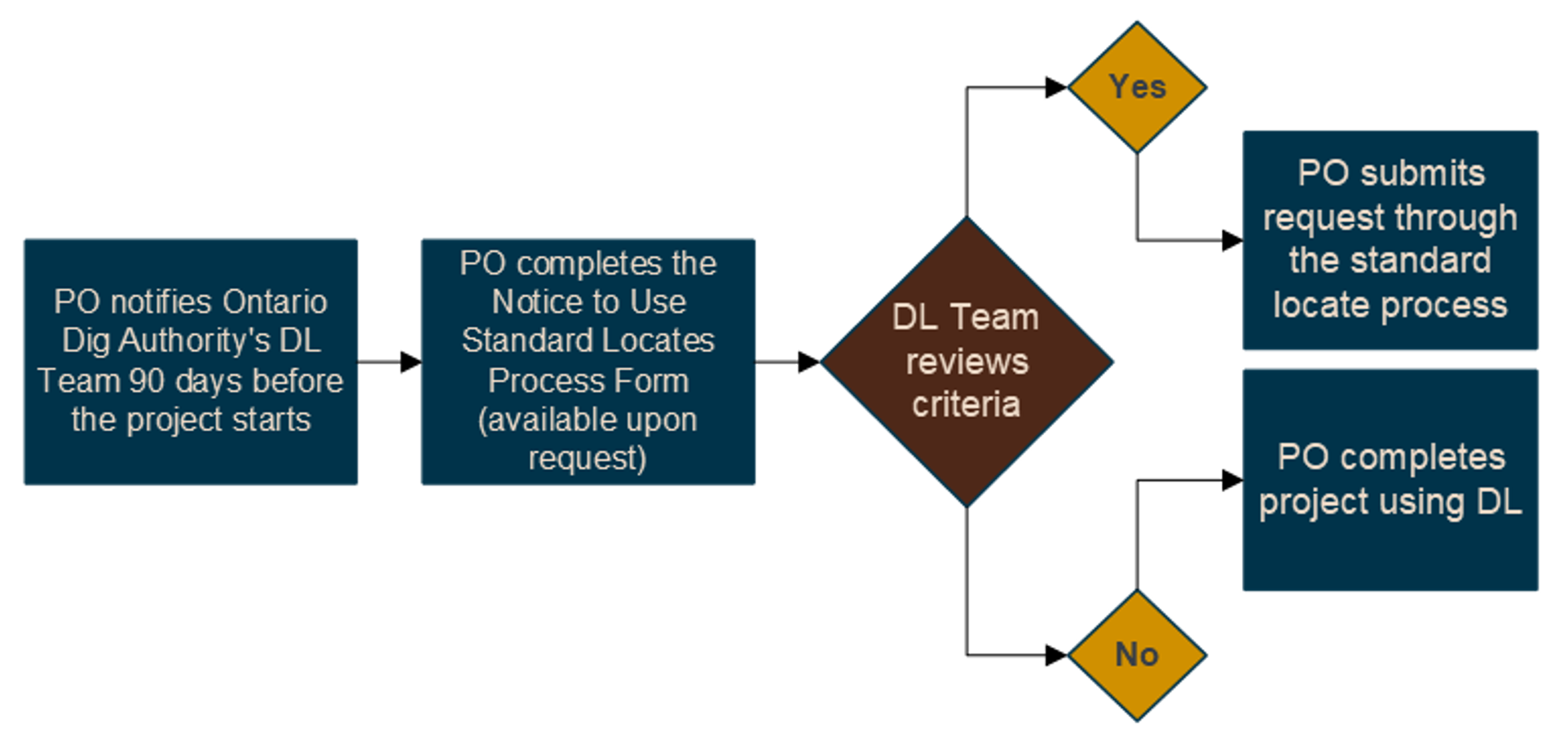
Ontario Dig Authority must be notified at least 90 days before the project start date regarding how the required locates will be fulfilled (e.g. through a DL submission or through the standard process):
-
- The PO must contact the Ontario Dig Authority’s DL Team with this information via email to DL@OntarioDigAuthority.ca
- The DL Team will review the information to confirm that the Designated Broadband Project falls under the parameters set out in O. Reg 376/24
-
- If the project falls under the parameters of the regulation, the PO will receive confirmation and can proceed to submit locate requests via the standard process as required.
- If the project falls outside of the parameters of the regulation, the DL Team will communicate the reasons why the project does not meet the criteria, and the PO will be required to use the DL model.
-
How To Submit a Locate Request Under a DL Notice Guide For Excavators
Important: Please ensure that you have Web Portal access, and the DL Notice #. If you require either of these things, please reach out to the DL Team.
Step 1:
Log in to the Web Portal
Step 2:
Search for the DL Notice #. Note: (This # will start with “502”)
How to Search: Click on the ‘Request Search’ box, enter the DL Notice # and click ‘Search’

Step 3:
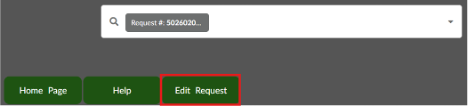
Click ‘Edit Request’ at the top of the page
Step 4:
Select ‘Create DL Locate Request’

Step 5:
Select a contractor ID that does not have any Suppressions or ALA’s applied, and proceed with creating your DL Locate Request
Dedicated Locator Best Practices for Underground Infrastructure Owners (UIOs)
Dedicated Locate Service Providers (DLSPs) must be agreed upon by the affected UIOs. DLSPs may be required to meet specific criteria as defined by the high-risk infrastructure owners, such as specialized training, quality assurance audits, reporting, insurance, ticket management systems, etc.
Project Owners are required to submit a DL Notice to Ontario Dig Authority at least 90 days prior to commencement of the work. However, DLSPs and Project Owners may approach UIOs for preliminary discussions to determine their criteria before submitting a DL Notice to Ontario Dig Authority.
Recommended Steps Before Receiving a DL Notice
- Ensure your organizations DL contact listed on your Notification Instructions Form is up-to-date
- Review the OUINS Act and know your requirements as a UIO in this process
- Ensure your mapping is up to date and able to be shared with a DLSP within 10 business days of receiving a DL Notice
- Although not a requirement under the OUINS Act, Ontario Dig Authority recommends UIOs enter into a contractual agreement with the DLSP performing locates on their behalf. Contact DL@OntarioDigAuthority.ca for more information
- Know the requirements for locating your infrastructure, and develop a utility-specific manual that can be shared with DLSPs
- Establish an escalation process for working with DLSPs
Recommended Steps After Receiving a DL Notice
- Review the DL Notice including the project scope of work and map of the affected area
- Steps required within 10 business days
- Agree in writing with the Project Owner upon the locator who will respond to notifications
- Provide mapping and any other information considered necessary to the DLSP
- Ensure that you have completed the above requirements, and confirm completion of this by selecting “Written Agreement Obtained” in the Web Portal
- Keep an open line of communication with the DL Team, the Project Owner, and the DLSP
- Ensure the DLSPs receive mapping updates when required for the duration of the project
Legislative Requirements
As per subsection 7 (7) of the Ontario Underground Infrastructure Notification System Act, 2012 (OUINS Act), the following steps should be completed within 10 business days of receiving a DL Notice:
(a) the project owner and any affected members who have not made a request under subsection (6.1) or who have received notice that their request has been denied under subsection (6.3) shall agree in writing on a locator who will respond to all notifications made by the Corporation under clause (9.1) (a) in respect of the project; and
(b) the affected members shall give to the dedicated locator mapping information, such as the location of the member’s underground infrastructure, and any other information that the dedicated locator considers necessary.
Dedicated Locator – Best Practices for the Excavator
The Dedicated Locator model is designed to support close collaboration between your team and the locator assigned to your project, allowing you to schedule locates when and where they are needed. This helps reduce the number of unnecessary relocates that require management.
A Dedicated Locator provides greater planning efficiency and flexibility for time-sensitive projects, work that covers a large area, and/or projects that extend over a longer duration.
What you need to know
The Dedicated Locator (DL) model is a major change to how large-scale project locates are being delivered in Ontario.
The DL model improves efficiency and provides Project Owners with greater flexibility by aligning locates with their project schedule, helping to reduce unnecessary worker and/or equipment downtime.
Project Owners should submit a DL Notice through the Ontario Dig Authority Web Portal and include the Excavator’s company information.
Excavators are responsible for following best practices and submitting valid locate requests with accurate map selections that reflect the described work area.
Our Recommended Best Practices
- Ensure valid locate requests are submitted 10 business days prior to the commencement of the described work
- Follow the Ontario Dig Authority Best Practices
- Ensure that the Dig Information on a Locate Request is consistent with the information that is listed on the DL Notice
- Keep an open line of communication with both the Project Owner, and the DLSP
- Ensure you have locate paperwork for each Underground Infrastructure Owner (UIO) listed on the locate status
- The Web Portal ‘Locate Status’ may list the public LSP contact information. However, the DLSP is responsible for providing valid locate requests for the UIOs that appear as “Suppressed by DL Notice”
- Review the OUINS Act to know your requirements as an Excavator
- If you have any questions, reach out to the DL Team or by phone at 1-844-257-9490 Ext. 8221
Dedicated Locator – Best Practices for Dedicated Locate Service Provider (DLSP)
Note: This information is geared toward DLSPs and may not include information intended for other stakeholders.
The DL model allows a Project Owner (PO) to hire a Dedicated Locate Service Provider (DLSP) to perform locates within a defined project area. The DLSP becomes the primary locating resource once affected Underground Infrastructure Owners (UIOs) have agreed upon the DLSP and provided the necessary mapping and information.
DLSPs play a critical role in project success.
What You Need to Know
Affected UIOs may require DLSPs to meet specific qualifications such as specialized training, quality assurance programs, insurance requirements, reporting standards, and ticket management systems. The Non-LAC Locator Framework was developed to assist LSPs in meeting these expectations.
Project Owners submit DL Notices through the Ontario Dig Authority Web Portal and include the DLSP they have put forth for the project.
DLSPs are responsible for obtaining approval from affected UIOs. Reach out to High-Risk Infrastructure Owners prior to project submission as they have specific requirements that can impact a project timeline.
Before Project Activation
- Review the DL Notice on the Web Portal and the Next Steps document provided by the DL Team at Ontario Dig Authority.
- Create a project tracker to monitor station codes, UIO contacts, approvals, mapping, contractual agreements, suppression statuses, follow-up dates, and project notes.
- Contact every affected UIO as soon as possible to request mapping, information, and obtain approval. This should occur within the first 3 business days after the DL Notice is released.
- Keep an open line of communication with the PO, the affected UIOs, and the DL Team. Routine touchpoints can help with project tracking in the critical time period before activation.
- Non-responsive UIOs should be reported to the PO & the DL Team
- When you have obtained all that is required for a DL project, inform both the Project Owner and DL@OntarioDigAuthority.ca.
Project Activation
The DL Team will send a project activation email to the Project Owner, the DLSP and any known contractors when all affected UIOs have complied with subsection 7(7) (a) and (b) of the Ontario Underground Infrastructure Notification System Act, 2012.
(a) the project owner and any affected members shall agree in writing on a locator who will respond to all notifications in respect of the project
(b) the affected members shall give to the dedicated locator mapping information, such as the location of the member’s underground infrastructure, and any other information
The DLSP must ensure the station codes with the status of Written Agreement Obtained on the DL Notice are located safely and accurately. These codes will appear as Suppressed by DL Notice on DL Locate Requests.
Station Codes with the status of Standard Locates Required on the DL Notice will respond to their own notifications. They are either an exempt UIO or have received approval from Ontario Dig Authority.
The DLSP must complete Locate Requests within 10 business days or as per the timeframe predetermined by Project Owner.
DL Notices
DL Notices will encompass the entire project and begin with 502
DL Locate Requests
DL Locate Requests are submitted within a DL Notice. They begin with 202 and are referred to as DL Project Work on the Web Portal
Key Takeaways
Contact early, track everything, communicate often, and prioritize safety. Successful Dedicated Locator projects are built on strong collaboration between the DLSP, the Project Owner, Underground Infrastructure Owners, Excavators and Ontario Dig Authority.
Advise the Project Owner and Ontario Dig Authority of any issues that may impact project timelines or safety.
Frequently Asked Questions
If a Project owner withdraws from DL in accordance with the regulation, does that mean the locates fall into the public stream?
Yes. Where the regulation is applied, locates will fall within the standard or specified request requirements of the Act.
How should we provide access to DLSPs for mapping and other information/records they may require without breaching security? What format should mapping be provided in?
You can provide them with a log into your system. This can be temporary access, or access to only what they need to see. This can be discussed in the DL agreement between the PO, Member and DLSP, depending on the project scale.
Ideally the best mapping you can provide, such as GIS format, PDF, or anything where the locator can clearly see where they should be locating within your project scope.
What is a “designated broadband project”?
Under provincial law, broadband projects where funding (in full or in part) has been provided through the Ministry of Infrastructure for the purposes of deploying broadband and high-speed internet infrastructure in Ontario is considered a designated broadband project.
Who is responsible for the fees associated with DL?
The Project Owner is responsible for DL fees. Please refer to our policy.
Is there a standard template for the DL agreement between PO and DLSP?
We have a base framework; you can add anything else you’d like to include to the agreement. Contact us and we can share the base framework.
Can Members view DL Requests in the web portal if a suppression has been applied?
Yes.
What does a member need to do within the initial 10 business days of receiving a DL 90 day notice?
Must agree in writing with Project Owner on a preferred DLSP.
When do you submit your DL Project Request Notice to Ontario One Call?
90 Days prior to project start date.
Who is eligible to use DL?
Designated Broadband projects, a dig project that satisfies such criteria as may be prescribed by the Minister, a dig project for which the Project Owner chooses to use a dedicated locator.
What is a Project Owner?
The party who intends to carry out the excavation or dig project.
What is a Dedicated Locator (DL)?
A single locate resource used to mark all underground infrastructure within project area. It is a good solution for large-scale and long-term projects that have complicated requirements.